
Download SeaNav US – Advanced Marine Navigation Software for Mac
Overview of SeaNav US
SeaNav US, developed by Pocket Mariner Ltd., is a comprehensive marine navigation program built specifically for macOS. Designed for sailors, fishing enthusiasts, and anyone who spends time on the water, this full‑version application combines real‑time chart rendering, route planning, and weather integration into a single, intuitive interface. The software is offered entirely in English and belongs to the “Sports” category, positioning it alongside other premium outdoor and navigation tools. SeaNav US stands out for its high‑resolution vector charts of the United States coastline, in‑depth tidal information, and seamless compatibility with a variety of external GPS receivers. Whether you are charting a weekend cruise through the Gulf of Mexico or plotting a deep‑sea fishing expedition off the Atlantic coast, SeaNav US provides the precision, reliability, and user‑friendly experience needed for safe and enjoyable voyages. The program is regularly updated to incorporate the latest hydrographic data, ensuring that users always have access to the most current navigational information. With a focus on security, the download is protected by industry‑standard SSL encryption, and the application itself runs in a sandboxed environment, protecting both your system and personal data.
Key Features of SeaNav US
- High‑Resolution Vector Charts: Detailed, scalable charts for the entire U.S. coastline, including inland waterways, ports, and harbors.
- Real‑Time GPS Integration: Supports NMEA‑0183 and Bluetooth GPS devices, providing live position tracking on the map.
- Advanced Route Planning: Create, edit, and optimize routes with waypoints, safe passages, and automated route recalculation.
- Tidal & Current Data: Integrated NOAA tidal predictions and current models for precise timing of departures and arrivals.
- Weather Overlays: Layer live radar, satellite imagery, and wind forecasts directly onto the navigation chart.
- Safety Alerts: Automatic warnings for shallow waters, restricted zones, and navigational hazards.
- Customizable Interface: Adjustable map themes, toolbar layouts, and shortcut keys to suit personal workflow.
- Export & Import Options: Supports GPX, KML, and CSV formats for sharing routes with other devices or applications.
- Secure Cloud Sync: Optional iCloud or Dropbox synchronization to keep your charts and routes backed up across multiple Macs.
- Regular Updates: Quarterly chart and software updates that are free for licensed users, ensuring compliance with the latest maritime regulations.
Installation & Usage Guide
Installing SeaNav US on your Mac is straightforward, and the process has been optimized for both beginners and power users. Begin by visiting the official Pocket Mariner website and clicking the “Download SeaNav US” button. The download is served over a secure HTTPS connection, and the installer file is signed by Apple to prevent tampering. Once the .dmg file is saved, double‑click to mount the disk image, then drag the SeaNav US icon into your Applications folder. macOS may prompt you to confirm the application’s authenticity; simply click “Open” to proceed.
After installation, launch SeaNav US from the Launchpad or Applications directory. The first run triggers a brief license activation wizard where you enter the purchased serial key. Activation occurs online, verifying your entitlement and unlocking the full feature set. Once activated, the program presents a welcome screen with a quick‑start tutorial that walks you through selecting a chart region, connecting a GPS receiver, and creating your first route.
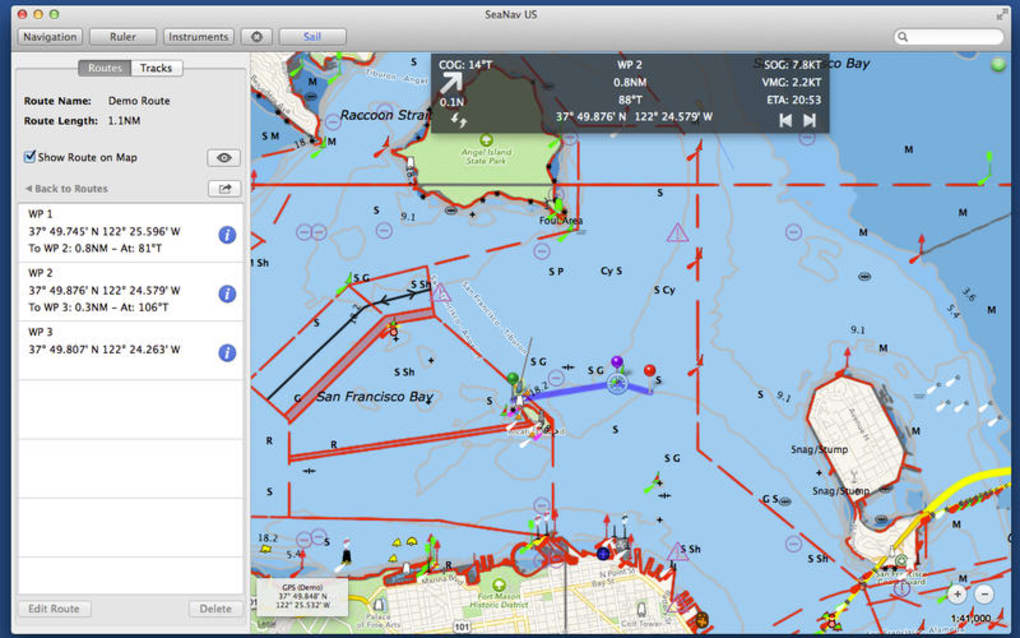
The main interface consists of a central map view flanked by toolbars for chart layers, navigation controls, and a sidebar for waypoint management. To begin navigating, select the “Chart Library” button, choose a region (e.g., “Pacific Northwest”), and load the corresponding vector chart. Connect your GPS device via USB or Bluetooth; SeaNav US automatically detects NMEA data streams and displays your vessel’s position as a bright, pulsing icon. Use the “Route Planner” to click on the map and drop waypoints, then click “Calculate Route” to generate an optimized path that respects depth contours and traffic separation schemes.
For advanced usage, explore the “Weather” menu to overlay radar and wind data, or the “Tides & Currents” panel to schedule arrivals based on predicted water levels. The application also includes a “Safety Alerts” window that monitors your position against known hazards and issues audible warnings when approaching danger zones. All settings are saved automatically, and you can export routes for use on other devices or share them with crew members via email.
Compatibility and System Requirements
SeaNav US is built exclusively for macOS, taking advantage of Apple’s Metal graphics framework for smooth, high‑performance chart rendering. The software is compatible with the following macOS versions:
- macOS 13 Ventura
- macOS 12 Monterey
- macOS 11 Big Sur (limited to version 2.5.0 and later)
Minimum hardware specifications are modest, ensuring that even older MacBook models can run the application efficiently:
- Processor: Intel Core i5 (3rd generation) or Apple Silicon M1/M2
- Memory: 4 GB RAM (8 GB recommended for multi‑layer charts)
- Storage: 500 MB free disk space for installation plus additional space for chart data (approximately 2 GB for the full U.S. dataset)
- Graphics: Integrated Intel Iris or Apple GPU supporting Metal
- Internet: Required for activation, updates, and weather data retrieval
SeaNav US also offers optional compatibility with external GPS devices that support the NMEA‑0183 protocol, including popular brands such as Garmin, Raymarine, and Simrad. Bluetooth connectivity is supported on Macs with built‑in Bluetooth 4.0 or later. For users who prefer wireless data, the app can receive AIS (Automatic Identification System) messages via a compatible AIS receiver, enhancing situational awareness in busy waterways.
Pros, Cons, FAQ and Final Verdict
Pros
- Extensive, high‑resolution vector charts covering the entire United States coastline.
- Seamless real‑time GPS integration with both USB and Bluetooth devices.
- Robust weather and tidal overlays that improve planning accuracy.
- Intuitive user interface tailored for macOS, with customizable toolbars.
- Regular free updates for licensed users keep charts current.
- Secure cloud sync options for backup and multi‑device access.
Cons
- Only available for macOS; no Windows or Linux version.
- Initial purchase price may be higher than some basic navigation apps.
- Requires an active internet connection for weather and tide data.
- Learning curve for advanced routing features can be steep for beginners.
- External GPS hardware is mandatory for full live‑tracking capability.
Frequently Asked Questions
Is SeaNav US a one‑time purchase or subscription?
SeaNav US is sold as a one‑time purchase. After buying the license you receive free lifetime updates to charts and software, although major version upgrades may be offered at a discounted price.
Can I use SeaNav US without an external GPS receiver?
The core chart and routing functions work offline, but live position tracking requires a connected GPS device. Without GPS, you can manually enter coordinates or simulate a vessel position.
How often are chart updates released?
Pocket Mariner releases chart updates quarterly. Licensed users receive these updates automatically through the in‑app update manager.
Is there a trial version of SeaNav US?
Yes, a 14‑day fully functional trial is available on the official website. The trial includes all features but will display a watermark after the trial period expires.
Does SeaNav US support AIS data?
If you connect a compatible AIS receiver, SeaNav US can display nearby vessels, their course, and speed, enhancing situational awareness in crowded waterways.
Conclusion & Call to Action
SeaNav US delivers a professional‑grade navigation experience for macOS users who demand accuracy, reliability, and a rich feature set while cruising U.S. waters. Its blend of high‑resolution charts, real‑time GPS, weather integration, and safety alerts makes it a compelling choice for both recreational sailors and serious mariners. Although the price point reflects its premium positioning and the lack of a Windows version may limit cross‑platform use, the value you receive in terms of up‑to‑date hydrographic data and a seamless macOS‑native interface justifies the investment.
If you’re ready to enhance your on‑water confidence and enjoy a smooth, secure navigation experience, download SeaNav US today. Click the button below to start your free trial or purchase the full license and set sail with the most reliable marine navigation tool available for Mac.
Download SeaNav USSeaNav US sets a high standard for marine navigation on macOS. The combination of precise charts, intuitive route planning, and reliable GPS integration creates a smooth workflow that keeps you focused on the water rather than the screen. While the initial cost may deter casual users, the ongoing free updates and robust safety features provide excellent long‑term value.







